


|
Name |
Popup Widget |
|---|---|
|
Google Play Link |
GET IT ON
Google Play
|
|
Category |
Tools |
|
Developer |
Total_Apps |
| Last version | 4.0.5 |
|
Updated |
|
|
Compatible with |
Android 8.0+ |
Introduction to Popup Widget MOD APK
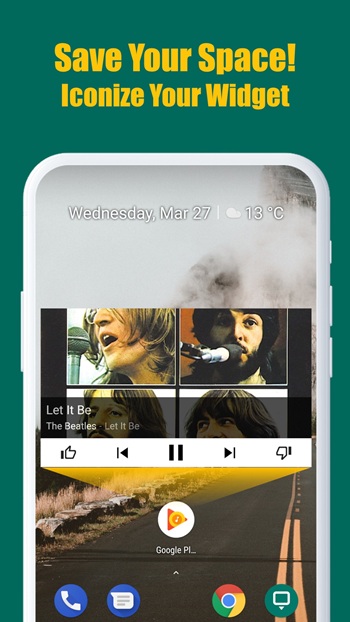
Popup Widget MOD is an Android app built for people who want a cleaner home screen without losing quick access to useful widgets. It turns widgets into small shortcut icons, so you can tap once and open them in a popup window instead of keeping them on the screen all day. That simple idea makes it easy to keep your layout neat while still reaching your calendar, notes, music controls, or battery tools fast.
The main use of this app is home screen organization. Large widgets can take up a lot of space, especially on smaller phones, and they can make a setup look crowded. Popup Widget MOD solves that by letting you place a compact 1x1 shortcut on the screen and open the full widget only when needed. For people who like a tidy setup, that feels a lot more practical than giving half the screen to a clock or weather panel.
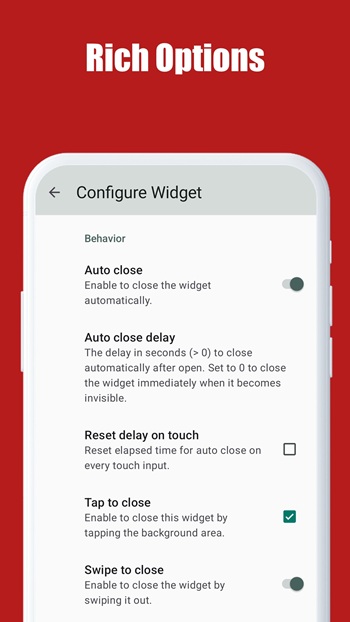
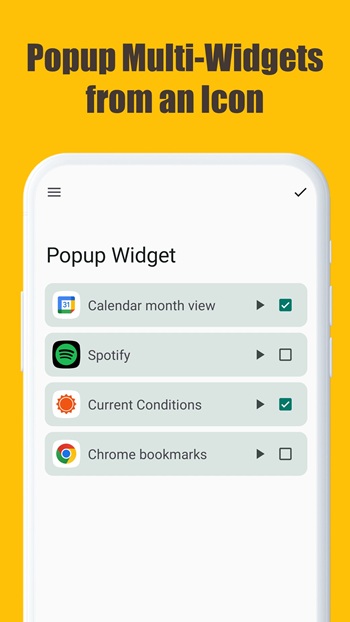
A strong point of the app is its flexibility. You can create shortcuts for a single widget or group several widgets together, which helps if you want one tap to open a small set of tools. It also includes many background skins and visual options, so the shortcut can match the rest of your theme instead of looking random. The popup animations and behavior settings add another layer of control, which is nice for users who care about how their phone feels in daily use.
Another benefit is convenience in day-to-day use. Since widgets open only when you call them, the app can help reduce background activity compared to leaving many widgets active on the home screen all the time. That can be useful for people who care about battery life, memory use, or launcher smoothness. It also makes scrolling through pages feel lighter, which is something you notice more once your home screen stops looking like a crowded desk.
Popup Widget MOD is especially useful for customization fans, minimalists, and anyone who likes keeping their phone clean but functional. It fits well for setups where space matters, such as smaller displays, heavily themed launchers, or productivity-focused layouts. If you use several widgets but hate how much room they take, this app gives you a middle ground that feels smart instead of messy.
There are still a few limits to keep in mind. The app depends on widgets you already use, so its value is tied to how useful those widgets are in the first place. Some users may also need a little time to set up shortcuts, skins, and popup behavior the way they want. If you prefer everything visible at once, opening widgets through a shortcut may feel like one extra tap. Even so, for people who want control, cleaner spacing, and a bit less clutter, the trade-off usually makes sense.
FAQs Popup Widget
What is Popup Widget MOD?
+
Popup Widget MOD is an Android app that lets you open widgets from small shortcut icons instead of keeping full-size widgets on your home screen.
What is Popup Widget MOD used for?
+
It is used to save home screen space, organize widgets better, and give you faster access to tools like clocks, calendars, notes, and music controls.
Which features stand out in Popup Widget MOD?
+
The app supports single or multiple widget shortcuts, custom background skins, popup animations, and settings that let you adjust how widgets open and appear.
Who should use Popup Widget MOD?
+
It suits people who like clean home screen layouts, use several widgets often, and want quick access without filling the screen with large panels.
Does Popup Widget MOD have any downsides?
+
It can take some time to set up properly, and some users may find the extra tap less convenient than leaving widgets visible on the home screen.
Discover More Interesting Apps
-

K2er
v0.4.103
45.92 Mb
Updated -
Game Booster 4x Faster Pro
v2.8.6
14.00 Mb
Updated -
Mod
Map coordinate
v1.2.37
8846211
Updated -
H4X Macro Game Booster Pro
v3.2.0
14.00 Mb
Updated -
Mod
Ad Blocker
v7.6.7
10.00 Mb
Updated -
Mod
Kimi
v3.1.2
67.22 Mb
Updated -
TikFinity
v2.6.7
89.22 Mb
Updated -
Fing
v12.13.4
24.25 Mb
Updated -
Mod
CCleaner
v26.16.1
88.41 Mb
Updated -
Glip Screen Recorder
v3.0.88
61.31 Mb
Updated










Share Your Thoughts